Gmail
An email service for sending and receiving electronic mail
Essential Skills
Do you know how to do all of the following things?
- Send an email to an individual or groups
- Manage your subscriptions and groups
- Create Contact Groups using labels
- Managing Google Groups
- Attach a file to an email
- Create an email signature
- Use the vacation responder feature
- Insert an image into an email
- Access emails in various folders (Trash, Sent, Inbox, Drafts, Spam)
- Star important emails and email threads
- Use the word processing features embedded in Gmail
- Insert a hyperlink into the body of an email
- Schedule an email to be sent at a future date and time
Do you manage someone else's inbox as well? Here are some tips!
Are you an administrator who needs to send an email with read receipts? Click here.

Uses for Teaching and Learning
How does this help you at Léman?
- Communicate with students, colleagues, and families
Unsure of which communication type to use? Check out this guide
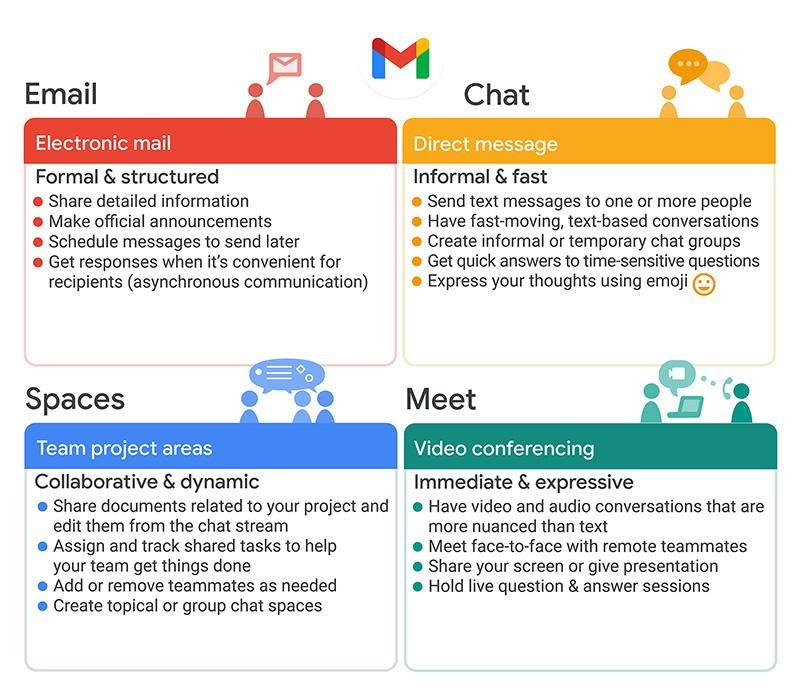
Need help transitioning from Microsoft Outlook to Gmail? Check out this guide.

Google Support Materials
Why not go straight to the source?
If you can't find a guide to resolve your issue or if you need immediate Tech Support, please send an email to tech@lemanmanhattan.org
Was this article helpful?
That’s Great!
Thank you for your feedback
Sorry! We couldn't be helpful
Thank you for your feedback
Feedback sent
We appreciate your effort and will try to fix the article